
 Club listing - club type
Click here for an OverviewOverviewThis section allows you to set up the types of clubs that people can create. For example, you might include "Charter Clubs" as a type, or "Interest Group" as a type, for those who prefer to create a more casual hobby club. Other types might include Professional Club, Kids Clubs or other type. When users create a club they will be expected to create their club within one of these categories so make sure your choices are comprehensive for the type of community you are serving with the Club Listing page. The following is an example of club categories created for an all-ages holiday resort community:
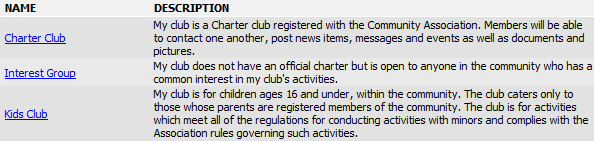
Note that for each type of club you can specify a different set of club management criteria for controlling who can join, how they can join, what they can do and see on the club page, etc. So if you will have a variety of clubs - some with easy access and few controls, and other clubs that will be tightly controlled, you will need to create a different CLUB TYPE for each set of club management criteria.
**** IMPORTANT!:
Add: Click this button to add a new line. You can then click the << Edit >> link to open the page for adding a new club type.
Order: This is the order in which the club types are displayed in the club type selector field. You can change the order by clicking on the up and down arrows or typing a new row number in for a row.
Name: This is the name of the club type that users will select when they are creating clubs. Make sure it is clear. To change the name, click on it to open the club type editor window.
Description: The text here comes from the Description field on the page where you add a club type. You can click on the club type in the Name column to edit the description. When users are creating clubs, they will read this description when deciding which club type to assign to their club so make sure it is clear and descriptive.
 : Click this Delete icon to remove a club type. You can only delete a club type if there are no clubs associated with the type you are deleting.
