
The User Portal page is a View Mode version of the user's My Page feature. It allows for the display of a customized user page with personalized profile information to be displayed while in view mode of the ACM as well as in the form of a Public Profile page that can be linked to from username links on other page types.
The User Portal page includes the following features:
the ability to modify all fields currently available on My Page
the ability to define public and private profile questions
the ability to add multiple pagelets to predefined zones
The User Portal page layout includes a section for greetings and an introduction at the top left, the Portal page menu in the upper right corner with links for editing information and changing passwords, and a main body section where the pagelets and other information are displayed. The pagelets area is divided into columns that you configure when you create the User Portal page. Multiple pagelets can then be displayed in each column, creating a multi-section grid-like format to your User Portal page. For example, you might choose to include a Quick Links pagelet with useful or commonly-used links, a pagelet for displaying current articles of interest, a general content pagelet with general information and a photo gallery pagelet for displaying pictures. These are just some examples of the types of information you can display on the User Portal page.
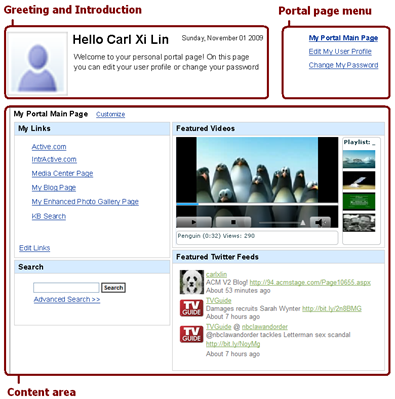
The User Portal page shows user-specific information based on the user that is currently logged into the ACM. You can configure the system to also display User Profile pages to other users - this is the Public Profile page that displays only information you indicate is permitted for public consumption.
Portal Main Page: This is the default page displayed to a logged in user. It displays a collection of pagelets in different columns. Each column has a list of additional pagelets available to be added. The combination and the layout of the showing pagelets are both customizable without going into the edit mode.
Editing pagelets in View Mode: There are a number of pagelets that end users can edit while in the view mode of their own User Portal page. These include the:
- RSS Feed Reader pagelet
- Twitter Feeds pagelet
- General Content pagelet
When users make edits to these pagelets in the view mode of their User Portal page, the changes only apply to their own personal account, not to others who use the same pagelet. Also, when they make these changes, the pagelets are updated immediately (they do not have to go through workflow approval levels).
Edit Profile Page: This is a page for the logged in user to change their account information or other profile information. This includes their profile picture, password and other personal information. The user can also decide which pieces of personal information will be included in their Public Profile page.
Change Password: This page allows the logged in user to change their password.